Tag: interview

  • SQL Patterns That Actually Show Up in Interviews (All 10, With Code)

    SQL Patterns That Actually Show Up in Interviews (All 10, With Code)

    Nobody fails a SQL interview because they don’t know the syntax. They fail because they stare at a question about “users with a 5-day login streak” and don’t recognize it as the exact same problem as “continuous subscription periods” and “consecutive winning games” — three phrasings of one pattern with one trick. The engineers who breeze through SQL rounds aren’t faster typists or syntax savants. They’ve seen the patterns enough times that a novel-sounding question instantly collapses into “oh, that’s gaps-and-islands” — and then the SQL is the easy part.

    There are about ten of these patterns, and they cover the overwhelming majority of what product companies actually ask. This is a tour of all ten — the keyword that gives each one away, the core trick, real SQL, and the follow-up the interviewer asks when you get the first version right. The goal isn’t to memorize ten queries; it’s to build the recognition reflex so that in the room, you spend your time on the interesting variation instead of rediscovering the base pattern from scratch. If you want the deeper argument for why this recognition skill matters more than raw syntax, I’ve made it in why senior engineers write SQL differently.

    One thing worth pinning to the wall before we start — the logical execution order of a query, because half of “why doesn’t my WHERE see my alias” questions dissolve once you know it: FROM → JOIN → WHERE → GROUP BY → aggregates → HAVING → SELECT → ORDER BY.

    The whole game in one table: interviewers rarely name the pattern, but the words they use give it away. Train yourself to hear the keyword and reach for the trick.

    1. Gaps and islands (consecutive sequences)

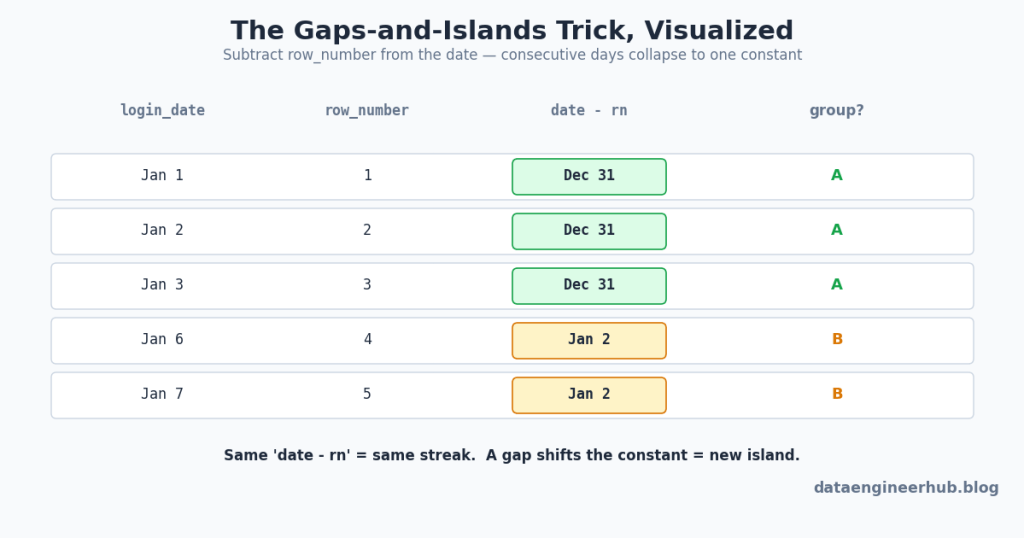
    Keywords: consecutive, streak, continuous, sessions, “5 days in a row.” This is the one that trips people up most, and the trick is almost magical once it clicks: subtract a row number from the ordered date. Consecutive dates produce the same constant; a gap shifts it, creating a new group.

    Why it works: for consecutive days the row number grows in lockstep with the date, so date − rn is constant. The moment a day is skipped, the constant jumps — and that jump is your new streak boundary.

    WITH distinct_logins AS (
      SELECT DISTINCT user_id, login_date FROM logins
    ),
    numbered AS (
      SELECT user_id, login_date,
             ROW_NUMBER() OVER (PARTITION BY user_id ORDER BY login_date) AS rn
      FROM distinct_logins
    ),
    login_groups AS (
      SELECT user_id, login_date,
             DATE_SUB(login_date, INTERVAL rn DAY) AS grp
      FROM numbered
    )
    SELECT user_id,
           MIN(login_date) AS streak_start,
           MAX(login_date) AS streak_end,
           COUNT(*)        AS streak_length
    FROM login_groups
    GROUP BY user_id, grp
    HAVING COUNT(*) >= 5
    ORDER BY user_id;

    The follow-up: “what if you need to detect the gaps themselves, not the streaks?” Switch to LAG() — compare each row to the previous login, flag where the difference isn’t 1 day, and cumulative-sum those flags into group IDs. Same idea, different vehicle. Note the DISTINCT up front: duplicate logins on the same day would silently break the row-number arithmetic.

    2. Top-N per group

    Keywords: top 3 per department, highest/lowest per group, latest record, first/last. The single most common window-function question. Partition by the group, order by the metric, filter on the rank.

    WITH ranked AS (
      SELECT *,
             ROW_NUMBER() OVER (PARTITION BY department ORDER BY salary DESC) AS rn
      FROM employees
    )
    SELECT * FROM ranked WHERE rn <= 3;

    The follow-up you must nail: “what if two people tie on salary?” That’s the interviewer probing whether you know the three ranking functions — and this is one of the most common trip-ups, so know it cold: ROW_NUMBER() gives 1,2,3 with an arbitrary tiebreaker; RANK() gives 1,1,3 (ties share a rank, next rank skips); DENSE_RANK() gives 1,1,2 (ties share, no gap). If the question is “top 3 salaries” and ties should all count, you want DENSE_RANK(), not ROW_NUMBER(). For the “latest record per user” variant, it’s the identical shape with ORDER BY created_at DESC and WHERE rn = 1.

    3. Running totals / cumulative metrics

    Keywords: running total, cumulative, so far, progressive. The frame does the work: SUM(x) OVER (ORDER BY dt ROWS BETWEEN UNBOUNDED PRECEDING AND CURRENT ROW).

    WITH daily_revenue AS (
      SELECT DATE(created_at) AS order_date, SUM(amount) AS revenue
      FROM orders
      GROUP BY DATE(created_at)
    )
    SELECT order_date,
           SUM(revenue) OVER (
             ORDER BY order_date
             ROWS BETWEEN UNBOUNDED PRECEDING AND CURRENT ROW
           ) AS running_total
    FROM daily_revenue;

    The follow-up: “now show each user’s running total and the global running total in the same query.” That tests whether you understand that two window functions can carry different PARTITION BY clauses side by side — a per-user frame partitioned by user_id, and a global frame with no partition — which usually means aggregating to user-day and day grains first, then combining.

    4. Event → state transformation

    Keywords: headcount over time, active subscriptions per day, “build the metric then track it.” Here the metric doesn’t exist in the data — you construct it from events. The classic is daily headcount: turn each hire into +1 and each termination into −1, then take a running sum over a date spine.

    WITH RECURSIVE date_spine AS (
        SELECT MIN(hire_date) AS dt FROM employee
        UNION ALL
        SELECT DATE_ADD(dt, INTERVAL 1 DAY) FROM date_spine
        WHERE dt < CURRENT_DATE()
    ),
    changes AS (
        SELECT hire_date AS dt, +1 AS delta FROM employee
        UNION ALL
        SELECT termination_date AS dt, -1 AS delta
        FROM employee WHERE termination_date IS NOT NULL
    ),
    daily_change AS (
        SELECT dt, SUM(delta) AS tdelta FROM changes GROUP BY dt
    )
    SELECT d.dt,
           SUM(COALESCE(c.tdelta, 0)) OVER (
             ORDER BY d.dt ROWS BETWEEN UNBOUNDED PRECEDING AND CURRENT ROW
           ) AS headcount
    FROM date_spine d
    LEFT JOIN daily_change c ON d.dt = c.dt
    ORDER BY d.dt;

    The “+1/−1 delta then running sum” trick generalizes to any state-from-events problem: concurrent sessions, active subscriptions, inventory on hand.

    5. Rolling / moving windows

    Keywords: 7-day moving average, 30-day active users, trailing metric. Same window machinery as running totals, but a bounded frame. The gotcha that separates candidates: ROWS BETWEEN 6 PRECEDING AND CURRENT ROW is 7 rows, not 6.

    SELECT sale_date, daily_sales,
           AVG(daily_sales) OVER (
             ORDER BY sale_date
             ROWS BETWEEN 6 PRECEDING AND CURRENT ROW
           ) AS moving_avg_7d
    FROM daily_sales;

    Window frames are worth truly internalizing, because half these patterns are just different frame boundaries over the same OVER() skeleton:

    Every rolling metric is just a choice of frame boundaries relative to the current row. And the ROWS-vs-RANGE distinction at the bottom is a favorite senior-level probe — worth knowing why one is deterministic.

    The ROWS-vs-RANGE trap: the default frame for SUM() OVER (ORDER BY dt) is actually RANGE, which groups all rows sharing the same ORDER BY value into one step — so two orders on the same date both get the day-end total, not their individual accumulation. ROWS treats each physical row independently. For running totals and time series, prefer ROWS to avoid unintended grouping on ties; being able to explain that difference unprompted signals real depth.

    6. Cohort / retention analysis

    Keywords: retention, cohort, week 0 / week 1, signup behavior. Ubiquitous at product companies. The shape is always: assign each user a cohort (their first-activity period), then measure activity by offset from that cohort.

    WITH user_cohort AS (
      SELECT user_id, DATE_TRUNC('week', MIN(activity_date)) AS cohort_week
      FROM user_activity GROUP BY user_id
    ),
    user_activities AS (
      SELECT a.user_id, c.cohort_week,
             DATE_TRUNC('week', a.activity_date) AS activity_week
      FROM user_activity a
      JOIN user_cohort c ON a.user_id = c.user_id
    ),
    cohort_size AS (
      SELECT cohort_week, COUNT(DISTINCT user_id) AS total_users
      FROM user_cohort GROUP BY cohort_week
    )
    SELECT ua.cohort_week,
           DATEDIFF('week', ua.cohort_week, ua.activity_week) AS weeks_since_signup,
           COUNT(DISTINCT ua.user_id) AS active_users,
           COUNT(DISTINCT ua.user_id) * 1.0 / cs.total_users AS retention_rate
    FROM user_activities ua
    JOIN cohort_size cs ON ua.cohort_week = cs.cohort_week
    GROUP BY ua.cohort_week, weeks_since_signup, cs.total_users
    ORDER BY ua.cohort_week, weeks_since_signup;

    The three-CTE structure — cohort assignment, activity-with-offset, cohort size for the denominator — is the reusable skeleton. Retention rate is just active-at-offset divided by the week-0 size.

    7. Self-join logic

    Keywords: compared to previous, more than their manager, bought A but not B. Any time you compare rows within the same table. The “A but not B” version is a clean anti-join:

    SELECT DISTINCT a.user_id
    FROM purchases a
    LEFT JOIN purchases b
      ON a.user_id = b.user_id AND b.product = 'B'
    WHERE a.product = 'A' AND b.user_id IS NULL;

    The trap here is NULLs. The instinct is often WHERE user_id NOT IN (SELECT user_id FROM purchases WHERE product='B') — but if that subquery returns even one NULL, NOT IN yields zero rows, silently. The LEFT JOIN ... IS NULL anti-join above is immune. Many “compare to previous row” self-joins are also better expressed with LAG(), which is cheaper than a correlated subquery and reads more clearly.

    8. Time-series expansion (date spine)

    Keywords: daily trend, fill missing dates, continuous timeline, “even days with zero.” The fix for gaps in a report is to generate the complete calendar and LEFT JOIN your data onto it, so missing periods become explicit zeros instead of vanishing rows.

    WITH RECURSIVE months AS (
        SELECT DATE_FORMAT(MIN(hire_date), '%Y-%m-01') AS month_start FROM employees
        UNION ALL
        SELECT DATE_ADD(month_start, INTERVAL 1 MONTH) FROM months
        WHERE month_start < DATE_FORMAT(CURRENT_DATE(), '%Y-%m-01')
    )
    SELECT m.month_start, COALESCE(SUM(x.metric), 0) AS metric
    FROM months m
    LEFT JOIN some_table x ON DATE_FORMAT(x.dt, '%Y-%m-01') = m.month_start
    GROUP BY m.month_start
    ORDER BY m.month_start;

    The production aside worth saying out loud: recursive date spines that recompute headcount by rescanning all employees every month are fine in an interview but expensive at scale. Mentioning that you’d back this with a precomputed monthly_headcount snapshot table in production — built by an incremental pipeline rather than recomputed each run — is exactly the kind of comment that separates a senior candidate, and it ties directly to not reprocessing what didn’t change.

    9. Percentiles / distribution

    Keywords: top 10%, percentile, ranking distribution. This is where NTILE()PERCENT_RANK(), and DENSE_RANK() live. “Top 10% of employees by rating” has a naive form and a fair form, and the interviewer usually wants the fair one:

    -- Fair version: handles ties at the cutoff correctly
    WITH latest_rating AS (
      SELECT emp_id, rating,
             ROW_NUMBER() OVER (PARTITION BY emp_id ORDER BY review_date DESC) AS rnk
      FROM performance_reviews
    ),
    ranked AS (
      SELECT *,
             DENSE_RANK() OVER (ORDER BY rating DESC) AS bucket,
             COUNT(*)     OVER () AS total_count
      FROM latest_rating WHERE rnk = 1
    )
    SELECT * FROM ranked WHERE bucket <= CEIL(0.10 * total_count);

    NTILE(10) forces exactly ten equal-sized buckets (take bucket 1); the DENSE_RANK approach is fairer when many people share the boundary rating. The killer follow-up is point-in-time correctness: “employees change departments over time — attribute each rating to the department they were in then.” That forces a slowly-changing-dimension join on a date range (start_date <= review_date < end_date) instead of a naive join to the employee’s current department — and getting that right is a strong signal.

    10. Detect overlapping date ranges

    Keywords: booking conflicts, overlapping subscriptions, double-booked, schedule clash. The elegant move is to reason about when ranges don’t overlap, then invert. Two ranges miss each other only if one ends before the other starts:

    -- Non-overlap:  a.end < b.start  OR  b.end < a.start
    -- Invert (De Morgan) -> the standard overlap condition:
    SELECT s1.customer_id,
           s1.subscription_id AS sub_1,
           s2.subscription_id AS sub_2
    FROM subscriptions s1
    JOIN subscriptions s2
      ON s1.customer_id = s2.customer_id
     AND s1.subscription_id < s2.subscription_id   -- avoid self- and duplicate pairs
     AND s1.end_date >= s2.start_date
     AND s2.end_date >= s1.start_date;

    Two details interviewers check: the s1.id < s2.id condition (so you don’t compare a row to itself or count each pair twice), and that you derived the overlap condition rather than memorized it — walking through the two non-overlap cases and applying De Morgan’s law is the move that earns the nod.

    Putting it together: the combined question

    Real interviews often stack two or three patterns. “Monthly revenue for completed 2025 orders, with the change vs the previous month, showing all 12 months even when revenue is zero” is three patterns at once: conditional filtering, a date spine (all 12 months), and LAG() for the month-over-month delta — over a base that first aggregates order_items to order grain before summing to month grain. If you can see it as “aggregate → spine → LAG” instead of one intimidating blob, you’ve already won. The recognition reflex is the whole skill; the syntax is just spelling.

    The gotchas nobody warns you about

    NOT IN with a NULL returns nothing. One NULL in the subquery and NOT IN silently yields zero rows. Use NOT EXISTS or a LEFT JOIN ... IS NULL anti-join for exclusions, every time.

    ROWS ≠ RANGE, and the default is RANGE. SUM() OVER (ORDER BY dt) groups tied values into one step. For a true row-by-row running total, spell out ROWS BETWEEN UNBOUNDED PRECEDING AND CURRENT ROW.

    “6 PRECEDING” is a 7-row window. Off-by-one on frame bounds silently produces the wrong average. Count the current row.

    ROW_NUMBER vs RANK vs DENSE_RANK is a tie question in disguise. When the interviewer says “what if they tie,” they’re testing which one you’d swap to. Have the 1,2,3 / 1,1,3 / 1,1,2 distinction ready.

    Wrapping a date column in a function kills index/pruning use. Prefer hire_date >= DATE_SUB(CURRENT_DATE(), INTERVAL 6 MONTH) over TIMESTAMPDIFF(MONTH, hire_date, ...) <= 6 — same logic, but the range predicate can use metadata the function form throws away.

    The one principle

    You don’t pass a SQL interview by knowing more syntax — you pass it by recognizing that the strange-sounding question in front of you is one of about ten patterns you’ve already solved a dozen times. Learn the keyword that gives each pattern away, learn the one core trick behind it, and practice the recognition until it’s instant. Then the interview stops being a memory test and becomes what it should be: a conversation about the interesting variation, conducted in a language you already speak fluently.


    Related reading: Why senior engineers write SQL differently · Why SQL is still the most valuable skill · Don’t recompute what didn’t change · Making these queries fast in production

  • Snowflake Interview Questions and Answers 2026

    Snowflake Interview Questions and Answers 2026

    Last year, I interviewed for a Senior Data Engineer role at three different companies. All three used Snowflake heavily. All three asked completely different questions.

    The first interview? They grilled me on virtual warehouse sizing and cost optimization for 15 minutes. The second? Entirely focused on data modeling and Time Travel. The third? They threw a live coding challenge at me involving complex window functions and variant data types.

    I passed two out of three. The one I failed? I bombed a question about how clustering keys actually work under the hood. I knew the basics but couldn’t explain the micro-partitioning details they were looking for.

    That failure taught me something: knowing how to USE Snowflake isn’t enough. You need to understand HOW it works and WHY it works that way.

    After that, I spent two weeks deep-diving into Snowflake internals, cost optimization, and performance tuning. I documented every question I encountered—not just from my interviews, but from colleagues who interviewed elsewhere, from Reddit posts, from Slack channels.

    This guide is the result. These aren’t generic questions you’ll find on every blog. These are real questions from actual 2025-2026 interviews, organized by difficulty and topic, with detailed answers that actually help you understand the concepts.

    How to Use This Guide

    Here’s how I’d actually use this list, depending on how much time you have. If you’ve got a week, work top to bottom — the order goes from foundational architecture to the operational stuff (cost, governance) that senior interviewers love to dig into. If you’ve got two days, jump straight to the category that matches the team you’re interviewing with: data platform teams obsess over performance and cost, security-heavy orgs grill on RBAC and Time Travel, and analytics teams care most about Streams, Tasks, and Dynamic Tables.

    If you’ve got one evening, do this: read the Common Mistakes section first, then skim the answers to questions 1, 2, 4, 9, and 13. That’s the minimum to not embarrass yourself. And whatever timeline you’re on — finish with the Preparation Checklist the night before. It’s saved me at least twice from walking in cold.

    Jump to a section

    • How to Use This Guide
    • Snowflake Interview Preparation Checklist

      Two days before any Snowflake interview I run through a checklist. It’s not glamorous and it’s not clever — it’s just the things I’ve watched myself forget when the calendar invite gets too close. I’ve split it into three buckets by how much time you have left, because the prep that works two weeks out is wasted noise the morning of.

      Two Weeks Out — Build the foundation

      • Re-read your SYSTEM$CLUSTERING_INFORMATION notes. The depth and overlap interpretation is the single most-asked follow-up after any clustering question. If you can’t explain why depth = 1 is good and depth = 100 is a problem, you’ll lose the senior signal.
      • Run a real query in Snowflake and read the Query Profile. Not from a screenshot — actually run it. Find one query that spills, one that has 100% pruning, and one that exploded. Internalise what the profile looks like.
      • Cost-model one warehouse out loud. Pick a workload, pick a size (Medium is a good default), multiply credits per hour by your estimated daily runtime, multiply by your contract rate. Do this in your head. Interviewers love when you put numbers on architecture.
      • Build a tiny CDC pipeline using Streams + Tasks. Five tables, one Stream, one Task. The hands-on memory makes question 11 trivial.
      • Read one current Snowflake release-notes page. Mention something released in the last 90 days during the interview — it shows you actually use the platform.

      48 Hours Out — Tighten the answers

      • Practise the architecture answer until you can deliver it in 90 seconds. Three layers, in order, with one example each. Time yourself.
      • Memorise the edition matrix for Time Travel and multi-cluster warehouses. Standard = 1 day Time Travel, Enterprise = up to 90, multi-cluster = Enterprise+. Getting this wrong is a credibility killer.
      • Pre-write three “tell me about a time…” stories that involve cost optimization, an incident, and a stakeholder disagreement. Map each to a Snowflake feature you used (resource monitor, Time Travel restore, RBAC redesign).
      • Re-read the Common Mistakes section below. One scan. That’s where I lose the most points.

      The Morning Of — Sharpen, don’t cram

      • Open Snowsight, run one query, read one profile. Five minutes. It primes your vocabulary.
      • Re-read your own résumé Snowflake bullets. Interviewers will quote them back at you and ask follow-ups. If you can’t defend a bullet, take it off.
      • Have one cost number and one performance number ready to drop. “We cut warehouse credits 38% by right-sizing and AUTO_SUSPEND” is a complete answer to half the cost questions.
      • Eat. Drink water. Stop reading interview articles 30 minutes before. You can’t learn anything new in the last half-hour — what you can do is arrive sharp instead of foggy.

      Snowflake Interview Questions by Company

      I asked five engineers in my network what their last Snowflake interview actually felt like, then cross-referenced with public interview reports and Glassdoor threads through 2026. The pattern is clear: the questions track the company’s actual workload. Stripe asks about high-cardinality joins because their fact tables are colossal. Capital One asks about RBAC because they’re a bank. None of these are leaked questions — they’re the recurring themes from publicly-shared experiences. Use them to weight your prep, not to memorise.

      Snowflake (yes, the company itself)

      Snowflake interviews push hard on internals because their engineers will be working on or around them. Expect at least one question that goes one level deeper than the docs.

      • “Walk me through what happens between query submit and result return — including everything Cloud Services does.” (See Q1 + Q4 for the foundation.)
      • “Why are micro-partitions immutable? What would change if they weren’t?” (Pruning, time travel, and zero-copy clones all collapse without immutability — see Q2 and Q3.)
      • “Design a feature: instant rollback for a multi-statement transaction. What metadata would you need?”

      Capital One

      Heavy AWS shop, regulated. Their Snowflake interviews skew toward security, governance, and operational discipline.

      • “Design RBAC for a 200-person analytics org with PII data and three regional teams.” (Q9 is your starter — extend with masking policies and row access policies.)
      • “How would you prove to an auditor that no analyst has queried a specific PII column in the last 90 days?” (ACCOUNT_USAGE.ACCESS_HISTORY is the lever.)
      • “A warehouse is racking up cost and you can’t suspend it because it’s running a critical job. What do you do, in order?” (Resource monitor + query queue + warehouse split — see Q13 and Q14.)

      JPMorgan Chase

      Similar profile to Capital One but with deeper data-modeling questions because their analytics platforms are older and more SQL-heavy.

      • “You have a slowly changing dimension that updates 5 million rows daily on a 2-billion-row table. Design the merge.” (MERGE INTO + clustering on the join key + measure with Query Profile.)
      • “When would you use a TRANSIENT table vs a temporary table vs a regular table?” (Storage cost and Fail-safe — see Q10.)
      • “Walk me through Time Travel limits across editions and how that affects your DR strategy.”

      Netflix

      Iceberg shop with significant Snowflake usage on the analytics side. Expect questions about engine interop and lakehouse patterns.

      • “When would you use a Snowflake-managed Iceberg table vs a regular Snowflake table?” (Storage location, multi-engine reads, and the cost trade-off.)
      • “How do you handle schema evolution when both Spark and Snowflake write to the same dataset?”
      • “Snowflake or BigQuery for a multi-tenant analytics product — defend your answer.”

      Airbnb

      Strong analytics-engineering culture — dbt, modeling, and metric layers come up a lot.

      • “How does Snowflake’s caching interact with dbt incremental models?” (Result cache vs warehouse cache vs metadata cache.)
      • “You have a dbt model that takes 40 minutes. Walk me through how you’d cut it.” (Q4’s Query Profile pipeline applies here.)
      • “Streams + Tasks vs Dynamic Tables for a CDC pipeline — when would you choose which?” (See Q11 and Q12, plus Mistake 6.)

      Walmart Labs

      Massive scale, retail-data heavy. Their Snowflake questions emphasise concurrency and cost at volume.

      • “Black Friday traffic. 5x normal load on the analytics warehouse. How do you handle it?” (Multi-cluster scale-out, not scale-up — see Mistake 3.)
      • “How would you architect Snowflake for 10,000 concurrent BI users?”
      • “Talk me through your warehouse-sizing methodology for a brand-new workload you’ve never seen before.”

      Stripe

      Engineering bar is famously high. Expect deep questions on performance, joins, and SQL correctness — they care that you can read query plans.

      • “Show me a Query Profile screenshot. What’s wrong, what would you fix first, and why?” (Have a real one ready from your prep.)
      • “Explain exactly when partition pruning fails.” (Cast functions on the WHERE column, OR conditions across columns, type mismatches.)
      • “How does Snowflake decide join order? When does it get it wrong?”

      Note: companies and interview formats change. The questions above reflect publicly-shared interview reports through early 2026 and are themes, not leaked items. Use them to weight your prep — not as a guarantee of what you’ll be asked.

      15 Common Snowflake Interview Questions and Answers

      Architecture Questions

      1. Explain Snowflake’s multi-cluster shared data architecture.

      Snowflake separates into three layers: Storage (compressed columnar micro-partitions on cloud object storage), Compute (independent virtual warehouses — elastically scalable MPP clusters), and Cloud Services (metadata, authentication, query optimization). This separation means you can scale compute without affecting storage costs, and multiple warehouses query the same data concurrently without contention.

      • Key point: Micro-partitions are 50-500MB, immutable, and self-describing with min/max metadata.
      • Follow-up to expect: “What happens when two warehouses query the same table simultaneously?”

      2. What are micro-partitions and how does partition pruning work?

      Micro-partitions are Snowflake’s fundamental storage units — immutable, compressed columnar files. Each stores metadata (min/max values, distinct count, null count) per column. When a query has a WHERE clause, Snowflake checks this metadata and skips partitions that can’t contain matching rows — this is partition pruning. It’s Snowflake’s primary optimization mechanism, equivalent to index seeks in traditional databases.

      • Pro tip: Use SYSTEM$CLUSTERING_INFORMATION('table') to check clustering depth and overlap.

      3. How does zero-copy cloning work in Snowflake?

      CLONE creates a metadata-only copy instantly — no physical data duplication. The clone shares underlying micro-partitions with the source. Only when either object is modified does Snowflake write new micro-partitions (copy-on-write). Use cases: creating dev/test environments from production without doubling storage costs, safe experimentation, and point-in-time snapshots for debugging.

      Performance & Optimization Questions

      4. How do you troubleshoot a slow query in Snowflake?

      Use the Query Profile in Snowflake’s UI and check these indicators in order:

      1. Partitions scanned vs total — high ratio means poor pruning → add CLUSTER BY or fix WHERE clauses
      2. Bytes spilled to local/remote storage — warehouse too small → scale up
      3. Queued time — concurrency bottleneck → scale out with multi-cluster warehouses
      4. Exploding joins — cartesian product from bad join keys → fix join conditions

      Also query SNOWFLAKE.ACCOUNT_USAGE.QUERY_HISTORY for historical slow-query patterns.

      5. When should you use a clustering key?

      Add a clustering key when: (1) your table exceeds 1TB, (2) queries consistently filter on specific columns (e.g., date, region), and (3) SYSTEM$CLUSTERING_INFORMATION shows high overlap or depth. Don’t cluster small tables or tables with random access patterns. Clustering incurs background maintenance costs (serverless credits), so only use it where the query performance gain justifies the cost.

      6. Explain scaling up vs scaling out in Snowflake.

      Scale up = increase warehouse size (XS → M → XL) — adds compute nodes to a single cluster for complex queries. Scale out = add clusters via multi-cluster warehouses (Enterprise edition) — handles more concurrent queries. Rule of thumb: scale up when individual queries are slow, scale out when queries are queuing.

      Data Loading Questions

      7. What is the difference between Snowpipe and COPY INTO?

      Snowpipe: serverless, continuous ingestion triggered by cloud event notifications (S3 SQS, Azure Event Grid). Loads files within minutes. Pay per-file. Best for near-real-time streaming. COPY INTO: batch loading using a warehouse. You control when it runs. More cost-effective for scheduled bulk loads. Use Snowpipe when latency matters; use COPY INTO when cost matters and you can tolerate batch windows.

      8. What are the different types of stages in Snowflake?

      Three types: (1) User stages (@~) — private, auto-created per user. (2) Table stages (@%table) — tied to a specific table. (3) Named stages (CREATE STAGE) — internal (Snowflake-managed) or external (S3, GCS, Azure Blob with IAM integration). Production pipelines should use named external stages with proper cloud IAM roles for security and auditability.

      Security & Governance Questions

      9. How does Snowflake handle access control?

      Snowflake uses Role-Based Access Control (RBAC). Privileges are granted to roles, and roles are granted to users. Key system roles: ACCOUNTADMIN (top-level), SYSADMIN (object management), SECURITYADMIN (user/role management). Best practice: never use ACCOUNTADMIN for daily work — create custom roles with least-privilege access. Enterprise edition adds column-level security (masking policies) and row-level security (row access policies).

      10. What is the difference between Time Travel and Fail-safe?

      Time Travel (0-90 days, configurable): user-accessible — query historical data with AT/BEFORE, restore dropped tables with UNDROP, clone from past states. Fail-safe (7 days, non-configurable): only accessible by Snowflake support for disaster recovery. You cannot query Fail-safe data. Use TRANSIENT tables to skip Fail-safe and reduce storage costs for non-critical data.

      data engineering Features Questions

      11. Explain Snowflake Streams and Tasks.

      Streams track row-level changes (inserts, updates, deletes) on a table — essentially change data capture (CDC). Tasks schedule SQL execution on a cron or interval basis. Together, they enable event-driven pipelines: a Task checks if a Stream has data (SYSTEM$STREAM_HAS_DATA), then processes the changes. This is Snowflake’s native alternative to external orchestrators for simple ETL flows.

      12. What are Dynamic Tables and when would you use them?

      Dynamic Tables are declarative data transformations with a target lag (e.g., “keep this table within 5 minutes of source”). You write a SELECT query defining the output; Snowflake handles incremental refresh automatically. Use them when: (1) you want dbt-like transformations without external tools, (2) you need guaranteed freshness SLAs, (3) you want Snowflake to manage incremental logic. They replace many Streams+Tasks patterns with simpler declarative SQL.

      Cost & Operations Questions

      13. How do you optimize Snowflake costs?

      Key strategies: (1) AUTO_SUSPEND warehouses after 1-5 minutes of inactivity. (2) Right-size warehouses — start small and scale up only if queries spill. (3) Use TRANSIENT tables for staging/temp data (no Fail-safe storage cost). (4) Set resource monitors with credit quotas and alerts. (5) Separate workloads by warehouse (ETL vs BI vs ad-hoc) to avoid over-provisioning. (6) Use result caching — identical queries within 24 hours return instantly at zero cost.

      14. What is a resource monitor in Snowflake?

      Resource monitors track credit consumption at the account or warehouse level and trigger actions when thresholds are reached — notify (email alert), suspend (stop new queries), or suspend immediately (kill running queries). Set up monitors for every production warehouse with warning at 75%, suspend at 90%, and immediate suspend at 100% of monthly budget.

      15. Explain Snowflake’s caching layers.

      Snowflake has three caches: (1) Result cache (24 hours) — identical queries return cached results instantly, zero compute cost. (2) Metadata cache (cloud services layer) — answers MIN/MAX/COUNT queries without scanning data. (3) Warehouse cache (local SSD) — recently accessed micro-partitions stay on the warehouse’s local disk. Understanding these is critical for cost optimization — result caching alone can save 30%+ on repetitive dashboard queries.

      Snowflake Interview Prep Resources & Tutorials

      Supplement your interview preparation with these hands-on resources to deepen your understanding of Snowflake’s architecture and features.

      Practice Exercises

      🎯 Hands-On: Set Up a Free Snowflake Trial

      Create a free 30-day Snowflake trial with $400 in credits. Practice queries against the pre-loaded SNOWFLAKE_SAMPLE_DATA database. Focus on: Time Travel queries, zero-copy cloning, warehouse management, and semi-structured data with FLATTEN.

      📝 Exercise: Diagnose a Slow Query

      Run this practice scenario: Create a 100M+ row table, write a query without proper filters, then use Query Profile to identify the bottleneck. Practice articulating: “The query scanned X partitions out of Y because…” — this is exactly how interviewers expect you to answer.

      -- Create test data
          CREATE TABLE interview_practice AS
          SELECT
            SEQ4() AS id,
            DATEADD('second', SEQ4(), '2020-01-01') AS event_ts,
            UNIFORM(1, 1000, RANDOM()) AS user_id,
            UNIFORM(1, 50, RANDOM()) AS category_id
          FROM TABLE(GENERATOR(ROWCOUNT => 100000000));
      
          -- Query without clustering (check profile)
          SELECT category_id, COUNT(*)
          FROM interview_practice
          WHERE event_ts BETWEEN '2023-06-01' AND '2023-06-02'
          GROUP BY 1;
      
          -- Add clustering key, re-run, compare profiles
          ALTER TABLE interview_practice CLUSTER BY (event_ts);

      🔄 Exercise: Build a Streams + Tasks Pipeline

      Interviewers frequently ask you to design a CDC pipeline. Practice building one:

      -- Source table
          CREATE TABLE raw_orders (order_id INT, status STRING, updated_at TIMESTAMP);
      
          -- Stream to capture changes
          CREATE STREAM orders_stream ON TABLE raw_orders;
      
          -- Task to process changes every 5 minutes
          CREATE TASK process_orders
            WAREHOUSE = compute_wh
            SCHEDULE = '5 MINUTE'
            WHEN SYSTEM$STREAM_HAS_DATA('orders_stream')
          AS
            MERGE INTO dim_orders t USING orders_stream s
            ON t.order_id = s.order_id
            WHEN MATCHED THEN UPDATE SET status = s.status, updated_at = s.updated_at
            WHEN NOT MATCHED THEN INSERT VALUES (s.order_id, s.status, s.updated_at);

      Recommended Video Tutorials

      Watch these tutorials to reinforce concepts that frequently come up in interviews:

      • Snowflake Architecture Deep Dive — Understand the three-layer architecture, micro-partitions, and how compute isolation works. Search “Snowflake architecture explained” on YouTube for official Snowflake channels.
      • Query Profile Walkthrough — Learn to read query profiles like an interviewer expects. Look for “Snowflake query profile tutorial” for step-by-step analysis of partition pruning, spilling, and join explosions.
      • Snowflake Cost Optimization Masterclass — Credit system, warehouse sizing strategies, and resource monitors. Essential for senior-level interview questions.
      • Dynamic Tables vs Streams+Tasks — Understand the trade-offs between these approaches, a common 2026 interview question for staff-level roles.

      Related Articles on DataEngineer Hub

      Certification Resources

      Pair your interview prep with certification study for structured coverage:

      • SnowPro Core Certification — Covers architecture, SQL, data loading, and security fundamentals. Validates interview-level knowledge.
      • SnowPro Advanced Data Engineer — Covers Streams, Tasks, Dynamic Tables, and pipeline design. Aligns with senior interview expectations.
      • How I Passed SnowPro Gen AI Certification — Study plan and tips from our experience.

      Common Snowflake Interview Mistakes

      I’ve made every one of these. Some I made twice. The pattern is always the same — I knew the right answer in theory, but under interview pressure I reached for the easier-sounding version and got caught on the follow-up. If you can train yourself to spot these in your own answers before they leave your mouth, you’ll convert a lot of “almost passed” into offers.

      Mistake 1 — Confusing micro-partitions with traditional partitioning

      Symptom: you say “Snowflake auto-partitions tables on the columns you specify.”
      Root cause: mixing up clustering keys with partitioning. Snowflake always partitions data into 50-500 MB micro-partitions automatically, regardless of your DDL. A cluster key only changes the order within those micro-partitions to improve pruning.
      Fix: rehearse the line “All Snowflake tables are micro-partitioned by default. Clustering keys influence the data layout to improve pruning, they don’t create new partitions.” Three sentences, end of story.

      Mistake 2 — Using ACCOUNTADMIN in production-access answers

      Symptom: you describe a real workflow and say “we grant ACCOUNTADMIN to the service account…”
      Root cause: habit. ACCOUNTADMIN is the role you use in your dev account because it removes friction. Senior interviewers hear it as a security red flag.
      Fix: always answer with the principle of least privilege. Custom roles inherit from SYSADMIN for object work and SECURITYADMIN for grants. ACCOUNTADMIN is for break-glass operations and billing — never for pipelines.

      Mistake 3 — Defaulting to “scale up” when they’re really asking about concurrency

      Symptom: they describe a queueing dashboard and you suggest moving from M to L.
      Root cause: you didn’t pause to distinguish “queries are slow” from “queries are queued.” They look similar in a Slack alert. They have opposite fixes.
      Fix: when you hear about concurrent users or queue time, your first answer is multi-cluster warehouse. Scale up is for individual slow queries with spilling. Confuse these two and the interviewer will know you’ve never operated a production warehouse.

      Mistake 4 — Skipping the cost angle

      Symptom: you give a beautiful technical answer and the interviewer says “and what does that cost?”
      Root cause: data engineers are often hired specifically because someone’s Snowflake bill exploded. Every architecture decision has a credit cost. If you don’t bring it up, they assume you don’t know.
      Fix: bolt one cost sentence onto every architecture answer. “We’d use Dynamic Tables here with a 5-minute target lag — that’s serverless credits, roughly X% more than a Task-based equivalent, but we save the orchestration overhead.” Even a rough number is better than silence.

      Mistake 5 — Citing Time Travel limits without knowing edition differences

      Symptom: “Time Travel goes up to 90 days, so we can…”
      Root cause: you read the docs page about the maximum, you didn’t read the page about who gets that maximum. Standard Edition caps at 1 day. Only Enterprise and above unlock the 0–90 range.
      Fix: default to “Up to 1 day on Standard, up to 90 days on Enterprise and above.” This single sentence is a subtle senior-level signal that you actually deal with edition decisions, not just feature lists.

      Mistake 6 — Mixing up Streams vs Dynamic Tables

      Symptom: “we use Dynamic Tables to capture changes from the source…”
      Root cause: both involve “incremental” and “change” so the words bleed together. They solve different problems.
      Fix: Streams expose row-level CDC metadata you consume in your own SQL. Dynamic Tables are a fully declarative target — you write the SELECT, Snowflake decides how to keep it fresh. If the question is “how do we know what changed?”, that’s Streams. If the question is “how do we keep this table fresh with one SQL definition?”, that’s Dynamic Tables.

      Mistake 7 — Forgetting Snowpipe is per-file billing

      Symptom: you recommend Snowpipe for everything that needs sub-hour latency.
      Root cause: Snowpipe feels free because it’s “serverless.” It isn’t. You pay per file plus a small overhead, and ingesting thousands of tiny files will absolutely bankrupt the budget faster than batched COPY INTO.
      Fix: the one-line rule: “Snowpipe wins on latency, COPY INTO wins on cost. Use Snowpipe when minutes matter, batch COPY INTO when you can wait, and aggregate small files before either.”

      Frequently Asked Questions (FAQ)

      What are the most common Snowflake interview questions?

      The most common Snowflake interview questions cover architecture (multi-cluster shared data, micro-partitions, three-layer separation), performance tuning (clustering keys, partition pruning, query profile analysis), data loading (Snowpipe, COPY INTO, stages), security (RBAC, masking policies, Time Travel vs Fail-safe), and cost optimization (warehouse sizing, auto-suspend, resource monitors). Senior roles also get questions on Streams, Tasks, Dynamic Tables, and system design.

      How do I prepare for a Snowflake data engineer interview?

      To prepare for a Snowflake data engineer interview: (1) Master the architecture — know the three layers (storage, compute, cloud services) and how micro-partitions work. (2) Practice SQL — focus on window functions, MERGE, FLATTEN, and QUALIFY. (3) Understand performance tuning — learn to read query profiles and diagnose slow queries. (4) Get hands-on — use Snowflake’s free trial with $400 credits to practice. (5) Study cost optimization — understand credits, warehouse sizing, and auto-suspend. (6) Review real-time features — Streams, Tasks, Dynamic Tables, and Snowpipe are frequently asked about in 2026 interviews.

      What SQL topics should I study for a Snowflake interview?

      For Snowflake SQL interviews, focus on: window functions (ROW_NUMBER, RANK, LAG/LEAD), CTEs and recursive CTEs, MERGE statements for upserts, FLATTEN for semi-structured JSON/Parquet data, QUALIFY clause (Snowflake-specific for filtering window function results), Time Travel queries using AT and BEFORE, VARIANT/OBJECT/ARRAY data types, and CREATE TABLE AS SELECT (CTAS) patterns. Many interviews include a live SQL coding exercise where you write queries against sample data.

      What is the difference between Snowflake and traditional data warehouses?

      Snowflake differs from traditional data warehouses in several key ways: (1) It separates storage and compute — you can scale each independently. (2) It uses a cloud-native architecture — no hardware provisioning or capacity planning. (3) It supports semi-structured data natively (JSON, Avro, Parquet) without ETL flattening. (4) It offers near-zero maintenance — no vacuuming, no index management, automatic micro-partition optimization. (5) It provides instant elasticity — spin up warehouses in seconds and auto-suspend when idle. (6) It enables secure data sharing without data movement via zero-copy cloning and shares.

      How many Snowflake interview rounds are there typically?

      A typical Snowflake data engineer interview process has 3-5 rounds: (1) Recruiter/HR screen (30 min) — background, salary expectations, role fit. (2) Technical phone screen (45-60 min) — SQL coding and Snowflake architecture questions. (3) System design round (60 min) — design a data pipeline or warehouse architecture. (4) Coding/hands-on round (60 min) — write SQL queries, diagnose query profiles, or solve data modeling problems. (5) Hiring manager/behavioral round (45 min) — leadership, collaboration, and project experience. Some companies combine rounds 2 and 4 into a single panel interview.

      Is Snowflake certification helpful for interviews?

      Yes, Snowflake certifications (SnowPro Core, SnowPro Advanced Data Engineer, SnowPro Specialty Gen AI) provide an edge in interviews. They validate foundational knowledge and signal commitment to the platform. However, certifications alone won’t get you hired — interviewers prioritize practical experience, SQL proficiency, and the ability to solve real-world data engineering problems. Use certification prep as a structured study framework, then supplement with hands-on practice in Snowflake’s free trial environment.

      What salary can I expect for a Snowflake data engineer role?

      Snowflake data engineer salaries in the US (2025-2026) range from $120K-$180K for mid-level roles and $160K-$250K+ for senior/staff roles (base + bonus + equity). Factors include location (remote vs Bay Area), company size, years of experience, and whether the role is at Snowflake itself vs a Snowflake customer. Cloud data engineering skills command a premium, and Snowflake-specific expertise adds 10-20% over general data engineering roles due to high demand and limited talent pool.

  • Advanced Snowflake Interview Questions for Experienced

    Advanced Snowflake Interview Questions for Experienced

     Stop memorizing the difference between a VARCHAR and a TEXT field. If you’re an experienced data engineer, you know that real Snowflake interviews go much deeper. Hiring managers aren’t just looking for someone who knows the syntax; they’re looking for an architect who understands performance, cost optimization, and scalable design patterns.

    Yet, most online resources are flooded with basic, entry-level questions that don’t prepare you for a senior-level discussion.

    This guide is different. We’ve compiled a list of advanced, scenario-based Snowflake interview questions for experienced engineers that reflect the real-world challenges you’ll be expected to solve. Let’s dive in.

    1. Architecture & Design Questions

    These questions test your high-level understanding of Snowflake’s architecture and your ability to design robust solutions.

    Q1: “We have a new data source that will be queried by both our BI team (frequent, small queries) and our data science team (infrequent, massive queries). How would you design the compute layer to handle this efficiently without one team impacting the other?”

    • Why they’re asking: This is a core test of your understanding of multi-cluster virtual warehouses. They want to see if you can design for concurrency and cost-effectiveness.
    • What a strong answer looks like:
      • “I would implement a multi-cluster warehouse strategy. For the BI team, I’d set up a dedicated warehouse, let’s call it BI_WH, in multi-cluster mode with an auto-scaling policy. This allows it to scale out horizontally to handle high concurrency during peak hours and scale back down to save costs.”
      • “For the data science team, I would create a separate, more powerful warehouse, say DS_WH. This could be a larger size (e.g., Large or X-Large) that is initially suspended. The data scientists can resume it when they need to run their heavy queries and suspend it immediately after, ensuring they have the power they need without incurring idle costs.”
      • “This completely isolates the workloads, ensuring the BI team’s dashboards remain fast and responsive, regardless of what the data science team is doing.”

    Q2: “Describe a scenario where you would choose a larger warehouse size (e.g., X-Large) versus scaling out a multi-cluster warehouse.”

    • Why they’re asking: To test your understanding of scaling up vs. scaling out.
    • What a strong answer looks like:
      • “You scale up (increase warehouse size) when you need to improve the performance of a single, complex query. For example, a massive data transformation job with complex joins and aggregations on terabytes of data would benefit from the increased memory and compute of a larger warehouse.”
      • “You scale out (add clusters to a multi-cluster warehouse) when you need to handle high concurrency—many users running simple, fast queries at the same time. A customer-facing dashboard with hundreds of simultaneous users is a perfect use case for scaling out.”

    2. Performance Tuning & Cost Optimization Questions

    For an experienced engineer, managing costs is just as important as managing performance.

    Q3: “A dashboard is running slower than expected. The query profile shows significant ‘table scan’ time. What are your first steps to diagnose and solve this?”

    • Why they’re asking: This is a classic performance tuning question. They want to see your troubleshooting methodology.
    • What a strong answer looks like:
      • “My first step would be to analyze the query profile in detail. A large table scan suggests that Snowflake is reading more data than necessary.”
      • “I’d immediately investigate the clustering key on the table. If the query frequently filters or joins on a specific column (e.g., event_timestamp or customer_id), but that column isn’t the clustering key, the table might have poor ‘clustering depth’. I would check SYSTEM$CLUSTERING_INFORMATION.”
      • “If the clustering is poor, I would consider defining a new clustering key on the most frequently filtered high-cardinality columns. For very large tables, I would also check if the query could be rewritten to take advantage of query pruning, for example, by adding a filter on a date partition column.”

    Q4: “Your Snowflake costs have unexpectedly increased by 30% this month. How would you investigate the root cause?”

    • Why they’re asking: This is a critical question about cost management and governance.
    • What a strong answer looks like:
      • “I would start by querying the snowflake.account_usage schema, which is the source of truth for all credit consumption.”
      • “Specifically, I would use the WAREHOUSE_METERING_HISTORY view to identify which virtual warehouses are responsible for the increased credit usage. I’d aggregate by day and warehouse to pinpoint the spike.”
      • “Once I’ve identified the warehouse, I’d query the QUERY_HISTORY view, filtering by the problematic warehouse and time period. I’d look for long-running queries, queries with high bytes spilled to local or remote storage, or an unusual increase in the number of queries.”
      • “Finally, I would implement resource monitors to prevent this in the future. I’d set up monitors to suspend warehouses or send notifications when they reach, for example, 80% of their monthly credit quota.”

    3. Data Ingestion & Integration Questions

    These questions test your practical knowledge of getting data into Snowflake.

    Q5: “Explain the differences between Snowpipe, Snowflake Tasks, and external tools like Fivetran/Airbyte for data ingestion. When would you choose one over the others?”

    • Why they’re asking: To assess your knowledge of the modern data stack and your ability to choose the right tool for the job.
    • What a strong answer looks like:
      • Snowpipe is best for continuous, event-driven micro-batching. You’d use it for near real-time ingestion from sources like S3, where files are being dropped frequently and unpredictably. It’s serverless and highly efficient for this pattern.”
      • Snowflake Tasks are for scheduled, batch-oriented workflows that run entirely within Snowflake. You’d use Tasks to orchestrate a series of SQL statements, like running an ELT job every hour to transform raw data that’s already landed in Snowflake.”
      • External tools like Fivetran or Airbyte are best for connector-based ingestion from third-party sources like Salesforce, Google Analytics, or a PostgreSQL database. They handle the complexity of API changes and schema replication, saving significant development time. You wouldn’t build a custom Salesforce connector if a reliable, pre-built one exists.”

    4. Scenario-Based & Problem-Solving Questions

    These are designed to see how you think on your feet.

    Q6: “You need to provide your marketing team with read-only access to a 50TB production table for a one-off analysis. The table is constantly being updated. How do you do this with minimal cost and without impacting the production environment?”

    • Why they’re asking: This tests your knowledge of Zero-Copy Cloning.
    • What a strong answer looks like:
      • “This is a perfect use case for Zero-Copy Cloning. I would create an instantaneous clone of the production table using the CREATE TABLE ... CLONE command. This operation doesn’t duplicate the 50TB of storage; it only copies the metadata, making it instant and virtually free from a storage perspective.”
      • “I would then grant the marketing team’s role SELECT privileges on this cloned table. They can run their heavy analytical queries on the clone using their own virtual warehouse, completely isolating their workload from our production systems. Once their analysis is complete, the cloned table can be dropped.”

    Conclusion

    These questions are just a starting point, but they represent the type of thinking required for a senior Snowflake Data Engineer role. It’s not just about knowing the features, but about knowing how to apply them to solve real-world problems of scale, performance, and cost. Good luck!